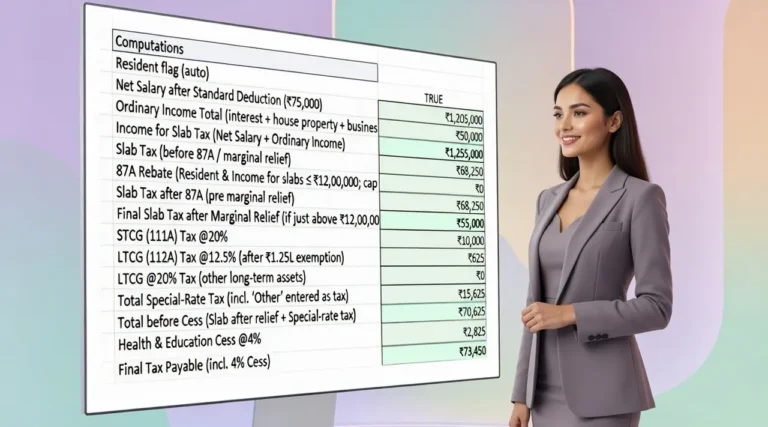

Calculate the impact of marginal relief on income tax using this practical Marginal Relief Calculator Excel. Compare tax liability with and without marginal relief and understand the potential tax saving in a simple Excel-based calculator.
Download Free Marginal Relief Calculator Excel →Marginal relief can reduce the impact of certain tax thresholds when the increase in tax becomes disproportionately high compared with the increase in income. The Marginal Relief Calculator Excel Template is designed to help you understand this calculation by comparing tax liability before and after applying the applicable marginal relief.
The workbook provides a structured way to enter taxable income, select the relevant taxpayer details and tax regime, consider the applicable rebate or surcharge conditions and review the resulting tax liability. It is intended as a practical Excel-based estimation tool rather than a substitute for professional tax advice.
It helps estimate tax liability with and without marginal relief and presents the resulting marginal relief or tax saving in a clear calculation summary.
How Does the Marginal Relief Calculator Work?
You enter the relevant taxable income and taxpayer details, select the applicable tax regime and provide the relevant surcharge or rebate information. The Marginal Relief Calculator Excel then calculates the tax liability before and after applying the relevant marginal relief logic.
The summary allows you to see the difference between the tax liability without marginal relief and the revised liability after marginal relief.
The workbook is intended to make a potentially complex marginal relief calculation easier to understand in an Excel format.
Marginal Relief Calculator Excel — Contents
- What Is a Marginal Relief Calculator Excel?
- What Is Marginal Relief in Income Tax?
- Types of Marginal Relief
- How the Marginal Relief Calculator Works
- Key Inputs Used in the Excel Calculator
- Rebate Marginal Relief vs Surcharge Marginal Relief
- Marginal Relief Excel Calculation Example
- How to Use the Marginal Relief Excel Template
- Who Can Use This Marginal Relief Excel Template?
- Important Assumptions and Limitations
- Frequently Asked Questions
- Download the Marginal Relief Calculator Excel
What Is a Marginal Relief Calculator Excel?
A Marginal Relief Calculator Excel is a spreadsheet tool designed to estimate the tax impact of marginal relief when a taxpayer’s income crosses a specified threshold.
Instead of manually working through multiple tax calculations, the Excel calculator provides a structured method to enter the relevant income and taxpayer information and review the resulting tax liability.
This Marginal Relief Calculator Excel Template is particularly useful when you want to compare the tax liability without marginal relief with the tax liability after applying the relevant marginal relief calculation.
Enter Tax Details
Provide the taxable income and other relevant taxpayer inputs required by the workbook.
Calculate Tax
The workbook calculates the applicable tax liability based on the selected inputs and tax treatment.
Review Relief
Review the marginal relief and resulting tax liability in the calculation summary.
What Is Marginal Relief in Income Tax?
Marginal relief is a tax mechanism intended to address situations in which crossing a specified income threshold can result in a tax increase that is greater than the additional income above that threshold.
The calculation generally involves comparing the additional tax arising because of the threshold with the additional income above the relevant threshold.
The exact calculation depends on the applicable tax provision, income level, taxpayer category, tax regime and the nature of the marginal relief being considered.
The taxpayer’s income is compared with the relevant threshold applicable to the calculation.
The increase in tax arising from crossing the relevant threshold is considered.
The workbook presents the resulting relief and revised tax liability in its calculation summary.
Types of Marginal Relief
The workbook is structured to consider marginal relief in the context of rebate and surcharge calculations. The applicable calculation depends on the taxpayer’s circumstances and the relevant tax rules.
Rebate Marginal Relief
This part of the workbook addresses the marginal relief calculation associated with the relevant rebate threshold and presents the resulting tax impact.
Surcharge Marginal Relief
This part of the workbook addresses marginal relief associated with surcharge thresholds and helps identify the resulting reduction in tax liability where applicable.
How the Marginal Relief Calculator Works
The Marginal Relief Tax Calculator Excel follows a structured sequence so that the user can move from basic tax inputs to the final marginal relief result.
Enter the taxable income relevant to the calculation.
Select the applicable age category or taxpayer details requested by the workbook.
Select the relevant tax regime used for the calculation.
Provide or select the applicable surcharge or other relevant rate where required by the workbook.
Review the tax liability before applying the relevant marginal relief.
Compare the revised tax liability and the marginal relief shown in the final calculation summary.
Want to calculate marginal relief quickly?
Use the free Marginal Relief Calculation Excel Template to work through the calculation in a structured format.
Key Inputs Used in the Excel Calculator
The Marginal Relief Excel Template uses a set of practical inputs to determine the applicable tax calculation and marginal relief.
Taxable Income
Enter the taxable income relevant to the marginal relief calculation.
Age Category
Select the applicable age category where required by the workbook.
Tax Regime
Select the applicable tax regime for the calculation.
Rebate Information
The workbook considers the relevant rebate marginal relief calculation where applicable.
Surcharge Rate
Enter or select the relevant surcharge rate used in the applicable calculation.
Final Tax Summary
Review tax liability before relief, after relief and the resulting marginal relief or tax saving.
Rebate Marginal Relief vs Surcharge Marginal Relief
Marginal relief can arise in different tax calculation contexts. The workbook separately considers rebate and surcharge marginal relief so that the user can understand which calculation is relevant to the entered information.
Rebate Marginal Relief
Focuses on the tax impact around the applicable rebate threshold and the resulting marginal relief calculation.
Surcharge Marginal Relief
Focuses on the additional tax impact arising around applicable surcharge thresholds.
Final Tax Comparison
The calculator brings the relevant calculations together in the final tax summary for easier review.
Marginal Relief Excel Calculation Example
Illustrative Result
In an illustrative calculation, assume taxable income of ₹50,10,000 and a tax liability of ₹13,75,000 before marginal relief.
After applying the relevant marginal relief calculation, the revised tax liability is ₹12,95,000.
Calculation Summary
Taxable income: ₹50,10,000
Tax without marginal relief: ₹13,75,000
Tax with marginal relief: ₹12,95,000
Illustrative marginal relief: ₹80,000
This example is intended to demonstrate how the Excel calculator presents the comparison. The actual result depends on the inputs entered and the applicable tax rules for the relevant taxpayer.

How to Use the Marginal Relief Excel Template
The workbook is designed so that users can enter the required information and review the calculation summary without building the marginal relief formula from scratch.
Enter the taxable income for which marginal relief is being evaluated.
Select the relevant age category requested in the workbook.
Choose the applicable tax regime for the calculation.
Enter or select the applicable surcharge information where required.
Check the tax liability before applying marginal relief.
Review the revised tax liability and marginal relief shown in the summary.
Who Can Use This Marginal Relief Excel Template?
This Marginal Relief Calculator Excel Template can be useful for individuals and professionals who want to understand the impact of marginal relief on an estimated income-tax calculation.
Salaried Individuals
Useful for understanding the potential impact of marginal relief when taxable income approaches a relevant threshold.
Tax Professionals
A practical Excel-based reference for tax calculation, explanation and client discussions.
Finance & HR Teams
Helpful for reviewing employee tax calculations and explaining marginal relief concepts.
Important Assumptions and Limitations
The workbook is prepared for Tax Year 2026-27 and should be reviewed against the applicable law before use.
The calculator provides an estimate based on the inputs entered into the workbook.
Tax rates, thresholds, rebates and surcharge provisions may change through legislation, notifications or other applicable updates.
The accuracy of the calculation depends on entering the relevant taxable income and taxpayer information correctly.
The workbook is intended as an estimation and educational tool and is not designed to replace the final tax computation for filing.
Consider professional tax advice where the calculation involves complex income, surcharge, rebate or marginal relief issues.
Marginal Relief Calculator Excel — FAQs
What is a Marginal Relief Calculator Excel?
A Marginal Relief Calculator Excel is a spreadsheet-based tax calculator that helps estimate the tax impact of marginal relief and compare tax liability before and after the applicable relief.
What is marginal relief in income tax?
Marginal relief is a mechanism intended to address certain situations where crossing an applicable income threshold can cause a disproportionate increase in tax compared with the additional income above that threshold.
What types of marginal relief are covered in this Excel template?
The workbook considers rebate marginal relief and surcharge marginal relief in its calculation structure.
What inputs are required in the Marginal Relief Tax Calculator Excel?
The workbook uses inputs such as taxable income, age category, tax regime and relevant surcharge or rebate information required for the applicable calculation.
Can this Marginal Relief Excel Template be used for Tax Year 2026-27?
Yes. The workbook is designed for Tax Year 2026-27. The applicable tax rules and thresholds should nevertheless be verified before using the result for an actual tax filing.
Does the calculator show tax with and without marginal relief?
Yes. The calculation structure provides a comparison of tax liability before and after the relevant marginal relief and shows the resulting relief or tax saving.
Is this Marginal Relief Calculation Excel Template suitable for tax filing?
It is intended for estimation and educational purposes. The final tax liability for filing should be determined using the applicable law and the taxpayer’s complete facts.
Can tax professionals use this Marginal Relief Calculator Excel?
Yes. It can be used as a practical Excel-based reference for understanding and explaining marginal relief calculations, subject to verification of the applicable tax provisions.
Where can I download the Marginal Relief Calculator Excel?
You can download the free Excel template from the download section below.

Download Free Marginal Relief Calculator Excel
Download the free Marginal Relief Calculator Excel for Tax Year 2026-27 and estimate tax liability with and without marginal relief in a practical Excel format.
Marginal Relief Calculator Excel 2026-27
The workbook provides a structured Marginal Relief Calculator, calculation summary and a separate How to Use sheet for easier understanding of the calculation.
Download Free Marginal Relief Calculator Excel →Free Excel utility for estimation and educational purposes.
Official Tax Sources
Reference note: The calculator should be used together with the applicable tax provisions, rates, thresholds, rebates and surcharge rules for the relevant Tax Year.
Disclaimer
This Marginal Relief Calculator Excel is provided for estimation and educational purposes only. It is not a substitute for professional tax advice or a final tax computation for filing. Tax liability depends on the taxpayer’s complete facts, applicable tax regime, income components, rebates, surcharge provisions and the law applicable for the relevant Tax Year.
Users should verify the latest applicable Income Tax Act provisions, rates, thresholds, notifications and other official guidance before relying on the calculator for an actual tax return or financial decision.