
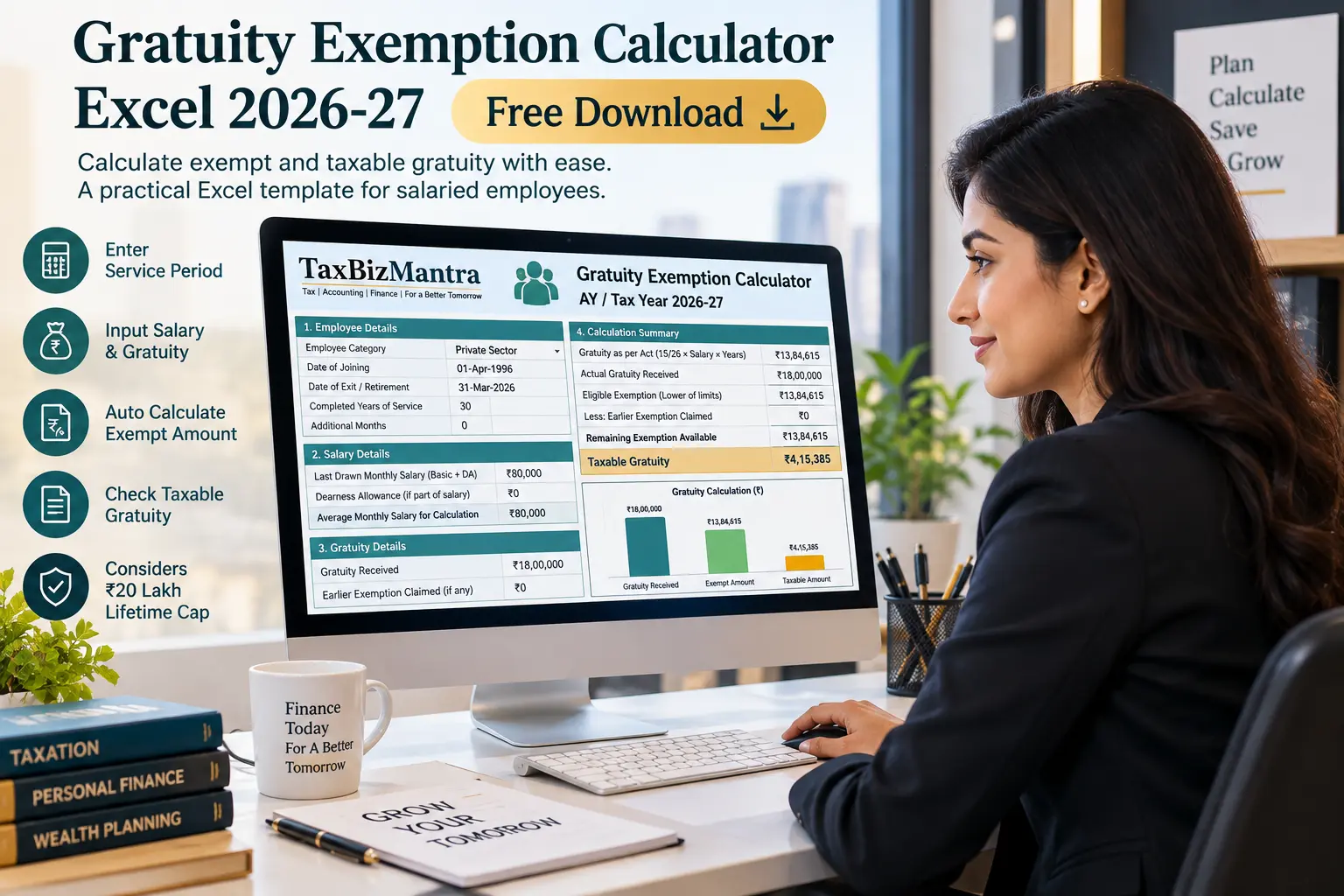
Calculate your estimated exempt and taxable gratuity with a practical Excel calculator covering employee category, service period, salary, actual gratuity received and the ₹20 lakh lifetime exemption cap.
Receiving Gratuity Is Simple. Calculating the Tax-Exempt Amount Is Not.
Gratuity calculations can look straightforward until you have to determine which employee category applies, which salary figure should be used, how completed years of service are treated and whether an exemption has already been claimed from an earlier employer.
The Gratuity Exemption Calculator Excel from TaxBizMantra is designed to bring these inputs together in one practical workbook. Instead of calculating the exemption manually, you enter the relevant information and the spreadsheet calculates the estimated exempt gratuity and taxable gratuity.
The workbook also separates the calculation for employees covered under the Payment of Gratuity Act from the calculation applicable to employees not covered by that Act, while separately handling the government/local authority/defence category described in the workbook.
What Does the Gratuity Exemption Calculator Excel Calculate?
The workbook estimates the exempt gratuity and taxable gratuity based on the employee category, service details, applicable salary information, actual gratuity received and exemption already claimed from an earlier employer.
For non-government categories, the workbook applies the relevant formula and then considers the ₹20 lakh lifetime cap. The taxable amount is calculated as the actual gratuity received less the estimated exempt gratuity.
One Workbook, Multiple Gratuity Calculation Paths
The Excel calculator first identifies the employee category and then uses the corresponding calculation approach described in the workbook. This is important because the salary basis and formula are not identical across all categories.
Government / Local Authority / Defence
The workbook treats this category separately and calculates the exempt gratuity based on the actual gratuity received.
Private — Covered by Gratuity Act
The workbook uses the 15/26 salary formula and applies the service-year rounding rule described in the spreadsheet.
Not Covered by the Gratuity Act
The workbook uses half of the relevant average monthly salary for the applicable completed years of service.
Final Exemption Check
For the non-government categories, the workbook compares the actual gratuity, formula entitlement and remaining lifetime cap to determine the estimated exempt amount.
Why Your Employee Category Matters
Selecting the correct employee category is one of the most important steps in the workbook because it determines which calculation path is followed.
Government / Local Authority / Defence
The workbook separately handles this category when determining the estimated exemption.
Private — Covered
The workbook uses the last-drawn monthly salary and the 15/26 formula, together with its service-year rounding convention.
Not Covered
The workbook uses the average monthly salary of the last 10 months and the half-month salary formula.
How the Gratuity Exemption Is Worked Out
The calculator follows a sequence rather than relying on one number. This makes it easier to see why the estimated exempt amount may differ from the gratuity actually received.
Want to Calculate Your Gratuity Instead of Doing It Manually?
Download the free Excel calculator and enter your own service, salary and gratuity details.

What Information Do You Need to Enter?
The workbook is designed around a small number of practical inputs. The exact salary field that matters depends on the employee category selected.
Employee Category
Select the applicable category from the workbook’s dropdown.
Completed Years
Enter the completed years of service.
Additional Months
Enter additional months beyond completed years, from 0 to 11.
Last Drawn Salary
Used for the covered employee calculation as specified in the workbook.
Average Salary
The workbook uses average monthly salary of the last 10 months for the not-covered calculation.
Actual Gratuity Received
Enter the gratuity amount actually received or expected to be received.
Earlier Exemption Claimed
Enter any exemption already claimed from an earlier employer.
Why Earlier Gratuity Exemption Matters
One of the most useful features of the workbook is the separate input for exemption already claimed from an earlier employer.
The workbook treats the ₹20 lakh exemption limit as a career-long lifetime cap rather than a fresh limit for every employer or every gratuity payment.
Remaining Lifetime Cap
The calculator uses the amount already claimed to determine the remaining available exemption within the ₹20 lakh lifetime cap.
This is why keeping records of previous gratuity exemptions can be important when calculating the exemption on a subsequent gratuity payment.
A Simple Gratuity Calculation Example
The workbook includes a worked example using 30 years of service, ₹80,000 last-drawn monthly salary and ₹18 lakh gratuity received. The example is useful for understanding how the spreadsheet moves from inputs to the final result.
Illustrative Inputs
Actual gratuity received in the workbook’s published example.
The example also uses 30 years of service and ₹80,000 as the last-drawn monthly salary.
How the Workbook Processes It
1. The employee category determines the calculation route.
2. The relevant service period and salary figure are used to calculate the formula entitlement.
3. The calculator checks the remaining lifetime exemption cap.
4. The actual gratuity received is considered before determining the estimated exempt amount.
5. Any amount above the estimated exemption appears separately as taxable gratuity in the workbook.
Calculate Your Gratuity Exemption in Five Steps
Important Assumptions and Limitations
A spreadsheet can make the arithmetic easier, but the result depends on the facts entered and the assumptions built into the workbook.
Gratuity Exemption Calculator Excel — FAQs
Click a question to expand the answer.
What is a Gratuity Exemption Calculator Excel?
What tax year does this gratuity calculator cover?
Does the calculator consider the ₹20 lakh gratuity limit?
What salary should I enter for a covered employee?
What salary should I enter if I am not covered by the Gratuity Act?
Does the calculator cover death-in-service gratuity?
Does the Excel calculator give professional tax advice?
Can I use the calculator for my own gratuity calculation?

Download the Gratuity Exemption Calculator Excel Template
Ready to calculate your estimated gratuity exemption? Download the free Excel workbook and enter your employee category, service period, salary, gratuity received and earlier exemption details.
Gratuity Exemption Calculator — Tax Year 2026-27
Download Free Excel Calculator ↓File link shown above is a dummy URL for now. Replace it with the final Excel file URL after uploading the workbook to the WordPress Media Library.
Sources & Reference Material
The calculator workbook identifies the following official government sources and statutory references as relevant background sources.
Disclaimer: The Gratuity Exemption Calculator Excel is provided for educational, informational and estimation purposes only. The calculation is based on the assumptions, formulas and terminology incorporated into the workbook. Actual tax treatment may depend on the employee’s circumstances, applicable statutory provisions, salary structure, previous gratuity payments and other facts.
This calculator should not be treated as professional tax, legal or financial advice. Before relying on the result for an actual gratuity settlement or tax return, verify the applicable provisions and obtain professional advice where required.