Calculate your estimated tax-exempt and taxable leave encashment using service years, eligible leave days, average salary, actual leave encashment received and the ₹25 lakh lifetime exemption cap.
Leave Encashment Can Be Tax-Free — But Only If You Get the Calculation Right.
Leave encashment often looks like a simple salary calculation. In practice, the tax treatment depends on when the leave encashment is received, the employee category, completed years of service, eligible leave days, average salary and the exemption already claimed during your career.
The Leave Encashment Exemption Calculator Excel from TaxBizMantra brings these inputs together in one practical workbook. It calculates the estimated exempt amount and taxable leave encashment instead of requiring you to work through the calculation manually.
One of the most important features is that the calculator first distinguishes between leave encashment received at retirement or resignation and leave encashment received during service. According to the workbook, leave encashed during service is fully taxable and the exemption calculation does not apply.
What Is the Leave Encashment Excel Template?
The Leave Encashment Exemption Excel Template is a free Excel-based calculator that estimates the tax-exempt and taxable portion of leave encashment for Tax Year 2026-27.
For leave encashment received at retirement or resignation, the workbook compares the applicable amounts including the actual leave encashment received, ₹25 lakh lifetime cap, 10 months’ average salary and cash equivalent of eligible leave to determine the estimated exemption for the non-government category.
If leave is encashed during service, the workbook treats the entire amount as taxable and does not apply the exemption calculation.
What Is Leave Encashment Exemption?
Leave encashment is the payment received by an employee in respect of accumulated earned leave. The tax treatment depends on the circumstances in which the payment is received.
Leave Encashment on Leaving Service
The workbook is designed to calculate the exemption where leave encashment is received at retirement, resignation or otherwise on leaving employment.
The applicable exemption depends on the employee category and the relevant statutory limits incorporated into the workbook.
Leave Encashment During Service
According to the workbook, leave encashment received while the employee continues in service is fully taxable and the leave encashment exemption does not apply.
The calculator therefore returns zero exemption for this scenario.
Leave Encashment at Retirement vs During Service
The first question to answer before calculating leave encashment exemption is not your salary or accumulated leave. It is when the leave encashment was received.
Exemption Calculation Applies
If the leave encashment is received when leaving employment, the calculator proceeds to determine the applicable exempt amount based on employee category and the relevant limits.
For the non-government category, the workbook compares four relevant amounts before arriving at the estimated exemption.
Entire Amount Is Taxable
The workbook states that leave encashment received during service is fully taxable and that no exemption applies.
How the Leave Encashment Exemption Calculator Works
The calculator follows a structured sequence so you can see how the final exempt and taxable amounts are derived.
Select Employee Category
Choose the applicable employee category from the workbook’s dropdown, including the government/local authority or non-government category.
Select When Received
Select whether the leave encashment was received at retirement/ resignation or during service.
Enter Service and Leave Details
Enter completed years of service and your actual earned leave balance according to employer records.
Enter Salary and Encashment
Enter the average monthly salary of the last 10 months and the actual leave encashment received.
Enter Earlier Exemption
Enter any leave encashment exemption already claimed from an earlier employer because the workbook treats the ₹25 lakh limit as a lifetime cap.
Review Exempt and Taxable Amount
The calculator automatically shows the estimated exempt leave encashment and the remaining amount treated as taxable leave encashment.
Four Amounts Used in the Leave Encashment Exemption Calculation
For the non-government calculation path, the workbook determines the exemption by comparing the applicable limits and using the lower amount.
The actual leave encashment received or payable to the employee.
The remaining exemption available after considering earlier exemption claimed.
Average monthly salary of the last 10 months multiplied by 10.
Average monthly salary divided by 30 and multiplied by eligible leave days.
Why Your Entire Accumulated Leave May Not Count for Exemption
One of the most important features of the calculator is its treatment of eligible leave days. The workbook applies a maximum of 30 days for each completed year of service when calculating the cash equivalent of eligible leave.
Maximum Eligible Leave
The calculator then compares this maximum eligible leave with the employee’s actual earned leave balance and uses the lower number.
Therefore, an employer’s leave policy allowing a higher accumulation does not automatically mean that the entire accumulated balance is used for the tax-exemption calculation in this workbook.
The ₹25 Lakh Leave Encashment Exemption Limit Is a Lifetime Cap
The workbook treats the ₹25 lakh exemption limit as a career-long aggregate limit rather than a fresh ₹25 lakh limit for every employer.
This is why the calculator includes a separate field for exemption already claimed from an earlier employer.
Remaining Lifetime Exemption
The workbook uses the resulting amount as the remaining lifetime exemption available for the current calculation.
The workbook notes that the ₹25 lakh limit was increased from the earlier ₹3 lakh limit through CBDT Notification 31/2023, effective 1 April 2023.
Don’t Calculate Leave Encashment Manually
Enter your service, leave, salary and encashment details in the Excel calculator and review the estimated exemption instantly.

What Salary Is Used for Leave Encashment Calculation?
The salary input is more specific than simply taking every component appearing on a salary slip. The workbook highlights an important distinction in the salary base used for its calculation.
Basic Pay
Basic Pay forms part of the salary input identified by the workbook.
Dearness Allowance
The workbook notes that only the portion of DA forming part of retirement benefit computation is relevant.
Turnover-Based Commission
Fixed-percentage-of-turnover commission may technically count where applicable, as noted in the workbook.
HRA and Other Allowances
The workbook notes that HRA and other allowances are excluded from this salary definition.
Bonuses
Bonuses are not included in the salary definition described in the workbook.
Check Your DA Treatment
Using the full DA when only part qualifies for retirement-benefit computation could overstate the calculated exemption.
Leave Encashment Exemption Calculation Example
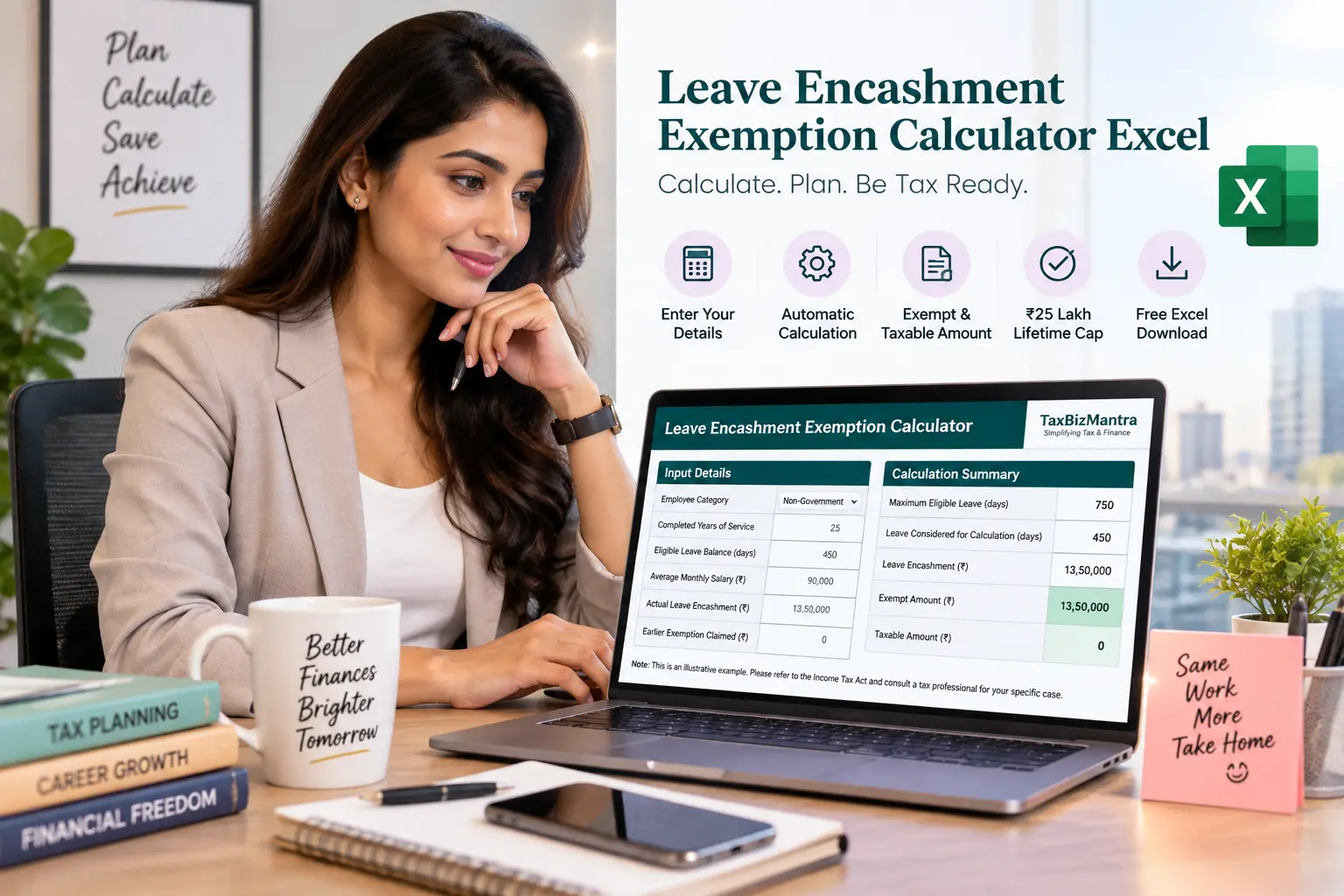
The workbook contains an illustrative scenario using 25 completed years of service, 450 days of earned leave, ₹90,000 average monthly salary and ₹13.50 lakh of actual leave encashment.
Illustrative Inputs
Actual leave encashment received in the workbook’s example.
Completed service: 25 years
Earned leave balance: 450 days
Average monthly salary: ₹90,000
How the Calculator Processes the Example
1. Maximum eligible leave is calculated as 30 days multiplied by completed years of service.
2. The actual leave balance is compared with the maximum eligible leave and the lower amount is used.
3. The cash equivalent of eligible leave is calculated using the average monthly salary divided by 30 and multiplied by eligible leave days.
4. The 10-month average salary amount and remaining lifetime cap are calculated separately.
5. The workbook then determines the estimated exempt amount and calculates taxable leave encashment as the amount remaining after the estimated exemption.
Calculate Leave Encashment Exemption in Five Steps
The workbook is designed to make the calculation straightforward: enter your details, and the calculation section updates automatically.
Who Can Use This Leave Encashment Calculator?
The workbook is intended for individuals who want to estimate the tax treatment of leave encashment using the inputs and assumptions built into the calculator.
Important Assumptions and Limitations
The calculator is designed as an estimation utility. The result depends on the information entered and the assumptions incorporated into the workbook.
Leave Encashment Exemption Calculator Excel — FAQs
Click any question to expand the answer.
What is a Leave Encashment Exemption Calculator Excel?
Is leave encashment taxable in India?
Is leave encashment received during service exempt from tax?
How is leave encashment exemption calculated at retirement?
What is the 30 days per year rule for leave encashment?
What is the ₹25 lakh leave encashment exemption limit?
Is the ₹25 lakh leave encashment limit per employer?
What salary is considered for leave encashment exemption?
Does the calculator use my entire accumulated leave balance?
Can I use this calculator for leave encashment during service?
Is leave encashment available under both tax regimes?
Is leave encashment exemption the same as gratuity exemption?
Does this Excel calculator calculate Section 89 relief?
Is this leave encashment calculator suitable for filing a tax return?
What is the difference between leave encashment and gratuity?

Download the Leave Encashment Exemption Calculator Excel
Ready to calculate your estimated leave encashment exemption? Download the free Excel workbook and enter your employee category, service period, leave balance, salary, actual encashment and earlier exemption details.
Leave Encashment Exemption Calculator — Tax Year 2026-27
Download Free Excel Calculator ↓Note: The file URL above is a dummy link. Replace it with the final WordPress Media Library URL after uploading the Excel workbook.
Sources for Leave Encashment Tax Information
The workbook refers to the following official government sources and statutory material. Always verify the current applicable provisions before relying on the calculation for an actual filing.
Disclaimer: The Leave Encashment Exemption Calculator Excel is provided for educational, informational and estimation purposes only. The calculation reflects the formulas, assumptions and terminology incorporated into the workbook and should not be treated as professional tax or legal advice.
The workbook references Section 10(10AA) of the Income Tax Act, 1961 and states that the exact corresponding section/schedule reference under the Income Tax Act, 2025 could not be independently confirmed at the time of preparation. Verify the current statutory provision before relying on the calculator for an actual tax return, settlement or filing.
Tax treatment may depend on individual facts, employment status, salary structure, leave records, previous exemptions and applicable law at the relevant time. For an actual tax position or filing, consult a qualified tax professional.